Bitlocker Adventures 1: SSHing into my router.
this is the first adventure i will register inside of this blog. this is how it went. One Friday after school i was bored. and i wanted to mess around with something. and i said "What if i SSH into my router? My ISP wouldn't allow it. Right? RIIII-" Boy was i wrong. I hopped onto my computer. i Googled™ it. read something about the user being 1234. and the "Router's password". opened CMD (yes ik ik not Linux skill issue) and typed:

well that didn't work.
some googling later. i found out you needed to add a -o HostKeyAlgorithms=+ssh-rsa flag to the SSH command. because:
Modern SSH clients, particularly OpenSSH versions 8.8 and newer, have deprecated or disabled the ssh-rsa host key algorithm by default due to its reliance on the SHA-1 hash algorithm, which is considered cryptographically weak. The server you are trying to connect to, however, is offering ssh-rsa as its host key type, suggesting it might be running an older or less updated SSH server version.i fixed the command.

well that ALSO didn't work. after more reading. i found out that in port 8000. you can get in a "Non-user" login platform. and if you type "Support" and you type the password behind the router....
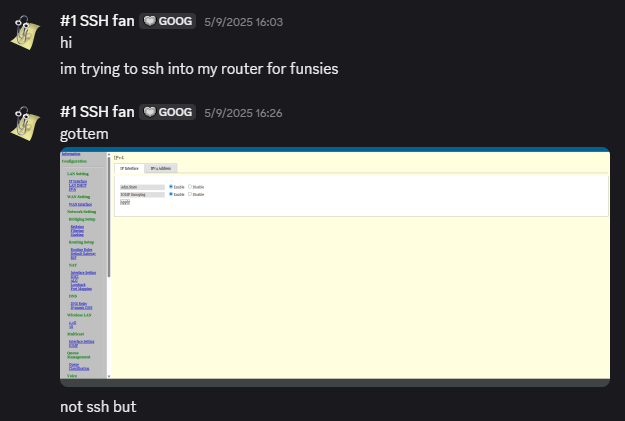
it worked!! that is something i did NOT know. but sadly. it is NOT ssh.... or is it? what if i do that but in ssh?

IT DID WORK! YAY! the help command showed this:

sys_info reported this:
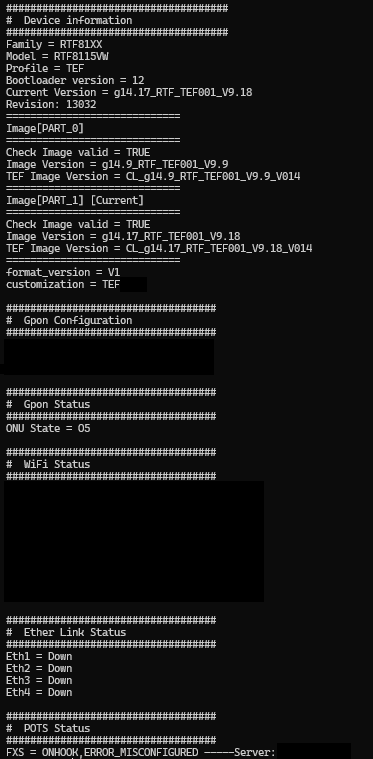
i have censored some stuff due to privacy concerns. that's it for today!